
Shareable Cart Links for Shopify
Built by ShopStack by Magemen
Earn by referring this app. Affiliate program
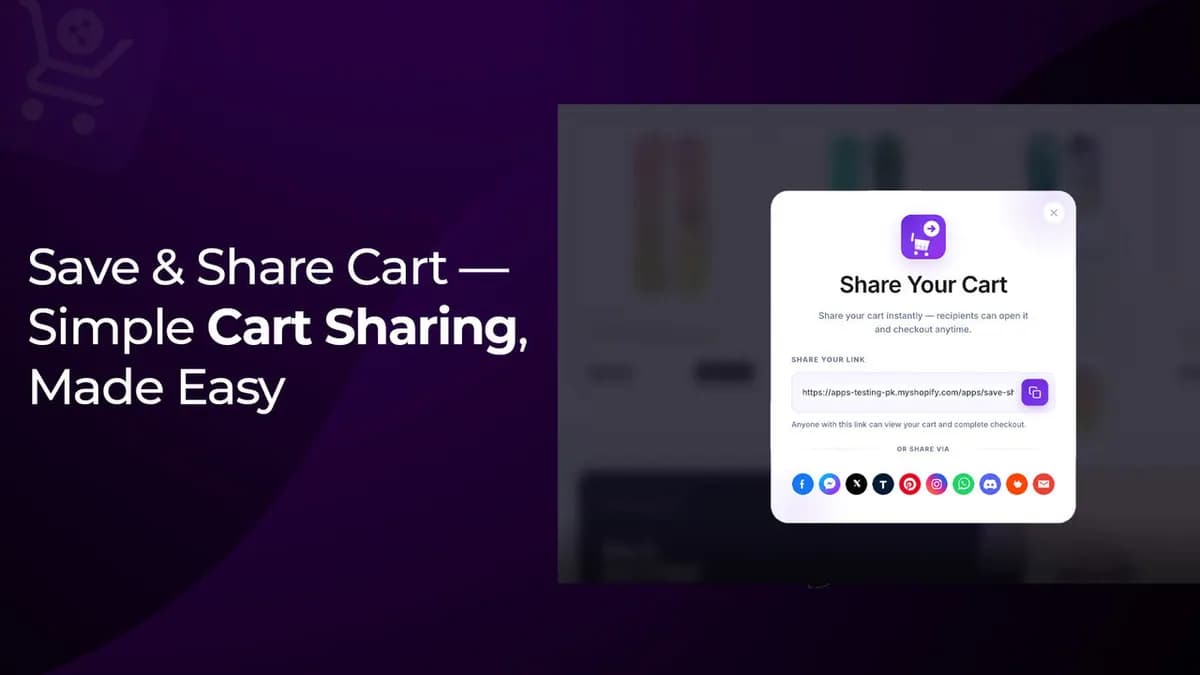
ShopStack Share Cart adds share and save controls to the Online Store cart. Shoppers create a link to their cart and send it by copy link or social apps. When someone opens the link, shared items load into their cart using the restore behavior the merchant chooses. Merchants review shared carts, opens, and top shared products in the app admin, with social sharing, button colors, save cart, conversion analytics, and CSV export. Setup uses a theme app embed. Shareable carts help gift shopping, sales assistants who text a ready cart, and B2C stores where friends finish an order together. Replace, merge, or ask-before-replace rules keep the recipient experience predictable. A free plan is available on the Shopify App Store. Built by ShopStack by Magemen, the same Auckland practice that ships custom Shopify apps when a public listing is not enough.
Highlights
Share Ready Carts
Friends open the same products with items ready to buy.
Theme App Embed
Add share and save controls with a simple Online Store embed.
Merchant Insights
Review shares, opens, top products, and conversion funnels.

Features
Share Cart Button
Shoppers create a link to their cart and copy or send it instantly.
Social Sharing
Share to WhatsApp, Messenger, and more with buttons that match your theme.
Cart Restore Rules
Choose replace, merge, or ask-before-replace when a shared link opens.
Theme-Matched Colors
Customize share button and popup colors to fit your storefront.
Shares Dashboard
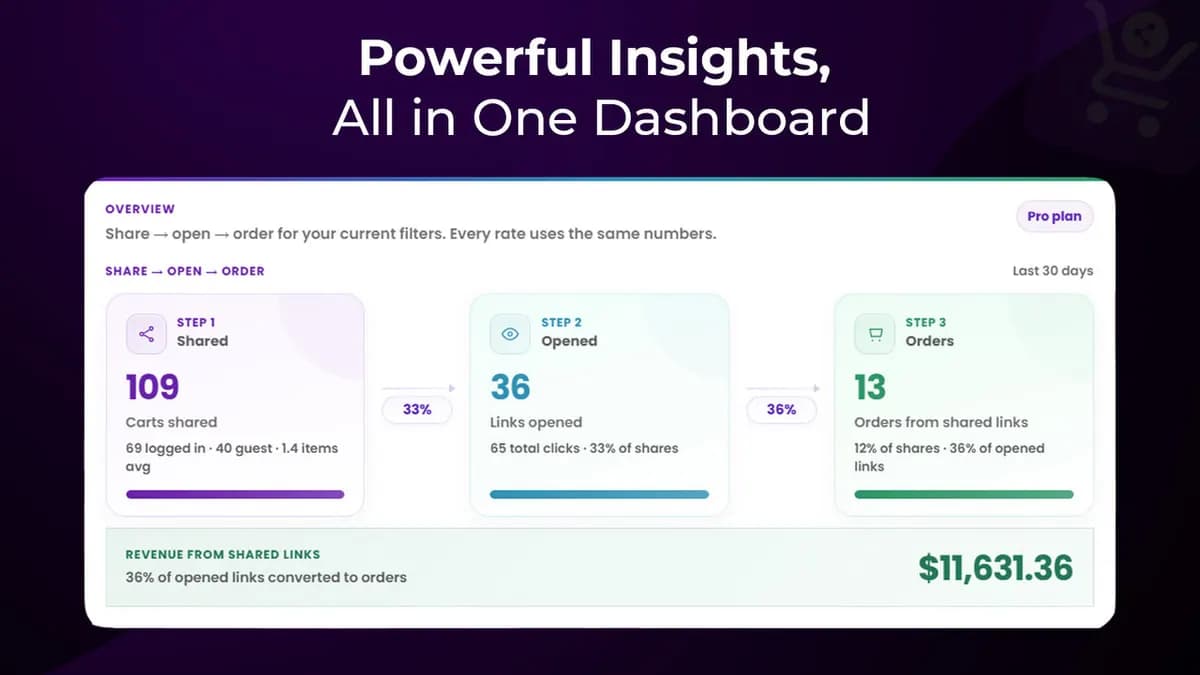
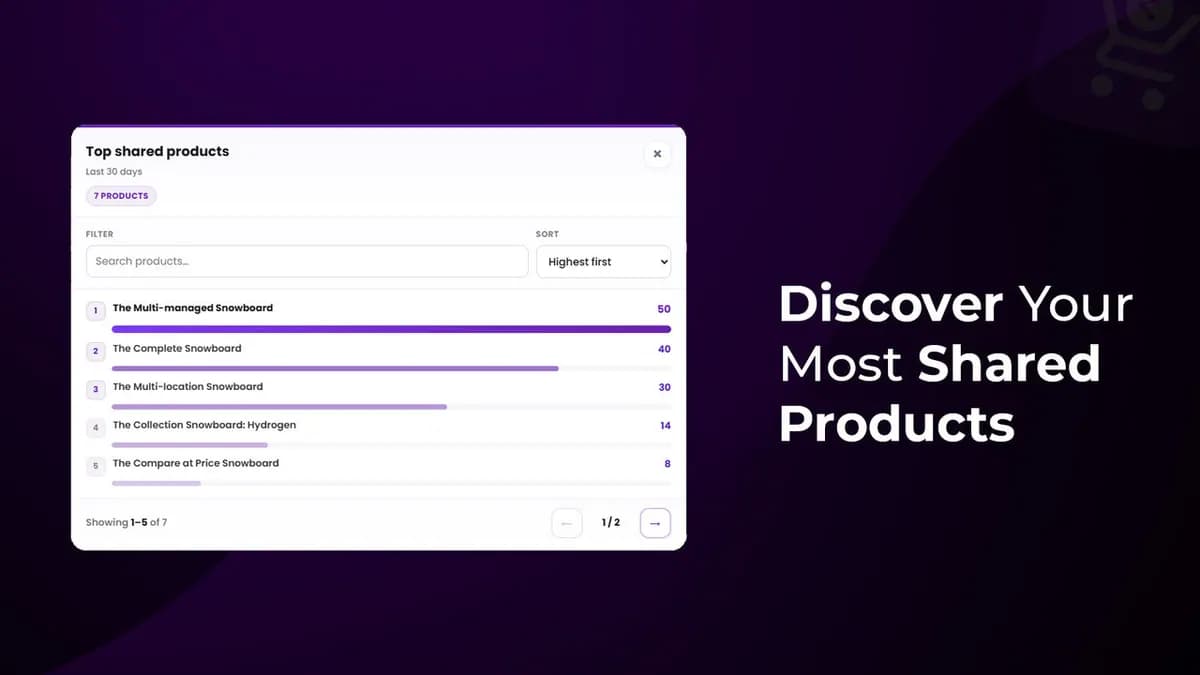
Track shared carts, opens, and most shared products in the app admin.
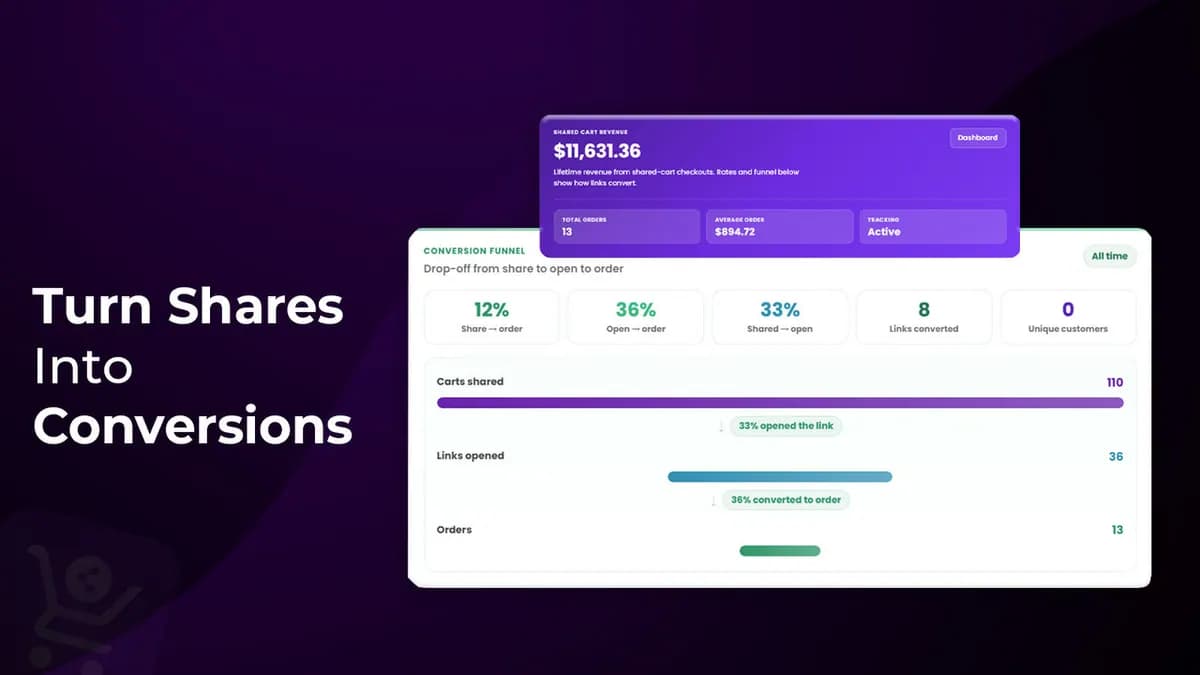
Conversion Analytics
See orders and revenue driven by shared links on Pro plans.
Save Cart
Let logged-in customers save carts for later (Pro).
CSV Export
Export carts and customer details for reporting (Pro).
How It Works
Shopper shares cart
On the cart page, they create a link and copy or send it socially.
Friend opens the link
Shared items load into their cart using your restore rules.
Checkout continues
Recipients buy with the same products already in the cart.
You track results
Admin shows shares, opens, top products, and conversion data.
Pricing
All paid plans include a 7-day free trial. Billed in USD via Shopify.
Free
$0
- 100 share links total
- Share cart button on cart page
- Dashboard with shares, opens, and charts
- Most shared products
- Recent links with open counts
- Opening a link replaces the visitor cart
Basic
$4.99/ month
7-day free trial
- 1,000 share links, each live for 30 days
- Share to WhatsApp, Messenger & More
- Button & popup colors match your store
- Search and filter all shared carts
- Opens by city and top shared products
- Merge carts or add missing items on open
Pro
$9.99/ month
7-day free trial
- 10,000 share links with no expiry
- Save cart for logged-in customers
- Orders and revenue from shared links
- Conversion Analytics page
- CSV export of carts & customer details
- Ask before replace and conversion pixel
What Share Cart does for Shopify merchants
Product links alone do not preserve a full basket. ShopStack Share Cart lets shoppers create a link to their cart and send it by copy link or social apps. When a recipient opens the link, shared items load using replace, merge, or ask-before-replace rules you configure. That behaviour matters for gift shopping, sales assistants who text a ready cart, and B2C stores where friends finish an order together.
Merchants review shared carts, opens, and top shared products in the app admin. Social sharing controls, theme-matched button colours, save cart, conversion analytics, and CSV export are available depending on plan. Setup uses a theme app embed on the Online Store cart. A free plan is available on the Shopify App Store.
Share Cart is built by ShopStack by Magemen in Auckland. For checkout rules, B2B carts, or ERP-coupled sharing that a public listing cannot cover, talk to us about custom Shopify app development rather than stretching the App Store product past its design.
After install, treat the first shared-link test like a checkout QA step: send a link to a second device, confirm line items and quantities, and verify your restore rule does not surprise recipients who already had items in their cart. That single test prevents most support tickets after launch.
Need something beyond a public listing? See custom Shopify app development.
How to set up Share Cart on Shopify
Share Cart adds share and save controls to the Online Store cart with a theme app embed. Shoppers create a link to their cart; recipients open it with items ready under the restore rules you choose.
Install Share Cart
Install ShopStack Share Cart from the Shopify App Store and open the app in Shopify Admin on the store where you want shareable carts.
Enable the theme app embed
In the theme editor, turn on the Share Cart app embed and save. Confirm the share control appears on the cart page on desktop and mobile.
Set cart restore rules
Choose replace, merge, or ask-before-replace when someone opens a shared link. Predictable restore behaviour prevents confused recipients and abandoned checkouts.
Match button colours to your theme
Customise share button and popup colours so the control feels native. Gift shoppers and sales assistants are more likely to use a control that looks like your brand.
Test a real share link
Add products to a cart, create a share link, open it in a private window, and confirm items load under your restore rule. Then complete a test checkout if your plan and store setup allow it.
Review the shares dashboard
Use the admin view of shared carts, opens, and top shared products. Pro plans add conversion analytics and CSV export when you need reporting beyond basic share volume.
Where shareable cart links help
Gift shopping and group buys
One shopper builds the cart; a partner or gift-giver opens the link and finishes payment. Shareable carts reduce screenshots and mismatched SKUs in chat threads.
Sales assistants and in-store follow-up
Staff can text or email a ready cart after a showroom visit so the customer does not rebuild the basket on their phone later.
Social and messenger sharing
WhatsApp, Messenger, and copy-link flows fit stores where recommendations already happen in chat. The recipient lands on a cart, not a lonely product page.
Save cart for later
On Pro plans, logged-in customers can save carts. That helps high-consideration catalogs where the first visit is research and the second visit should resume the same basket.
Frequently asked questions
- What happens when someone opens a shared cart link?
- Shared items load into the recipient’s cart using your restore rule: replace, merge, or ask-before-replace. Test each rule once so support knows what shoppers will see.
- Does Share Cart work with my theme?
- It installs via a theme app embed on the Online Store cart. After enabling the embed, verify the share control on your live cart template, including mobile.
- Is there a free plan?
- Yes. Share Cart has a free plan on the Shopify App Store, with paid plans and a free trial for advanced features such as deeper analytics and CSV export.
- Can staff use it for assisted selling?
- Yes. Building a cart on a device and sending the link is a common pattern for showrooms and remote selling. Keep restore rules clear so the customer’s existing cart is not wiped by surprise.
- When do I need a custom app instead?
- Use custom Shopify app development for B2B cart rules, ERP coupling, wholesale price lists, or checkout behaviour that a public share-cart listing cannot express.
Related: Apps hub · Restock Alert · Custom Shopify app development